วันอาทิตย์ที่ 15 กุมภาพันธ์ พ.ศ. 2558

hacker

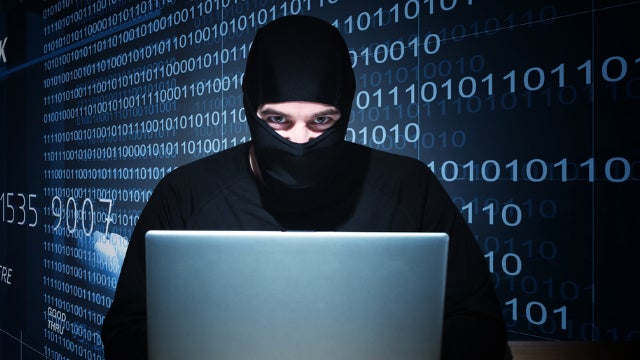
Hacker sentenced to 21 months in U.S. prison for 15 million scheme

Hacker sentenced to 21 months in U.S. prison for 15 million scheme
แฮ็คเกอร์ถูกตัดสินจำคุกอเมริกา 21 เดือน ข้อหาพยายามโจรกรรม 15 ล้านเหรียญ

Hacker sentenced to 21 months in U.S. prison for $15 million scheme
(Reuters) - A Massachusetts man was sentenced to 21 months in prison on Friday for his role in a cybercrime scheme that hacked accounts at banks, brokerage firms and government agencies in an attempt to steal more than $15 million, U.S. prosecutors said.
Robert Dubuc, 41, pleaded guilty to wire fraud conspiracy, conspiracy to commit access device fraud and identity theft in federal court in New Jersey in April. U.S. District Judge Peter Sheridan in Trenton imposed the sentence on Friday.
A co-defendant, Oleg Pidtergerya, pleaded guilty to the same charges and is scheduled for sentencing in December.
Prosecutors said the two men were members of an international cybercrime ring led by Oleksiy Sharapka and Leonid Yanovitsky of Kiev, Ukraine, who have also been indicted but remain at large.
The group hacked into accounts in 2012 and 2013 at global banks and other institutions, including Citigroup Inc, JPMorgan Chase & Co, the U.S. Department of Defense, PayPal and others, and diverted funds into accounts and debit cards they controlled, prosecutors said.
The group then used "cash out" crews to tap the stolen funds by withdrawing cash from ATMS and making fraudulent purchases, according to prosecutors. Dubuc operated a crew out of Massachusetts, while Pidtergerya led a crew in New York, the government said.
Eight individuals have been charged in the case.


Hacker sentenced to 21 months in U.S. prison for $15 million scheme
แฮ็คเกอร์ถูกตัดสินจำคุกอเมริกา 21 เดือน ข้อหาพยายามโจรกรรม 15 ล้านเหรียญ

(Reuters) - A Massachusetts man was sentenced to 21 months in prison on Friday for his role in a cybercrime scheme that hacked accounts at banks, brokerage firms andgovernment agencies in an attempt to steal more than $15 million, U.S. prosecutorssaid.
รอยเตอร์ - ชายคนหนึ่งจากรัฐ Massachusetts ถูกตัดสินจำคุก 21 เดือนเมื่อวันศุกร์ สำหรับคดีที่เขาโจรกรรมข้อมูลบัญชีในธนาคารต่างๆ บริษัทนายหน้า และหน่วยงานต่างๆของราชการ เพื่อที่จะนำไปใช้ในการโจรกรรมเงินมากกว่า 15 ล้านเหรียญ เจ้าหน้าที่อัยการของสหรัฐฯกล่าว

   Robert Dubuc, 41, pleaded guilty to wire fraud conspiracy, conspiracy to commit access device fraud and identity theft in federal court in New Jersey in April. U.S. District Judge Peter Sheridan in Trenton imposed the sentence on Friday.
    Robert Dubuc ชายวัย 41 ปี ถูกแจ้งข้อกล่าวหาว่าร่วมกันกระทำความผิดในการโจรกรรมข้อมูลโดยศาลของรัฐ New Jersey ในเดือนเมษายน ผู้พิพากษาของรัฐ Peter Sheridan ใน Trenton ได้ทำการกล่าวคำพิพากษาแล้วเมื่อวันศุกร์
A co-defendant, Oleg Pidtergerya, pleaded guilty to the same charges and is scheduled for sentencing in December.
นาย Oleg Pidtergerya จำเลยร่วม ถูกแจ้งข้อกล่าวหาเดียวกัน และการพิจารณาคดีจะมีขึ้นในเดือนธันวาคม

     Prosecutors said the two men were members of an international cybercrime ring led by Oleksiy Sharapka and   Leonid Yanovitsky of Kiev, Ukraine, who have also been indicted but remain at large.
ทางอัยการกล่าวว่าชายทั้งสองคนเป็นสมาชิกของกลุ่มอาชญากรไซเบอร์ที่ก่อคดีในระดับนานาชาติภายใต้การนำโดย Oleksiy Sharapka และ Leonid Yanovitsky จากกรุง Kiev ประเทศ Ukraine ผู้ซึ่ง ถูกแจ้งข้อหาแล้ว แต่ยังคงลอยนวล

    The group hacked into accounts in 2012 and 2013 at global banks and other institutions, including Citigroup Inc, JPMorgan Chase & Co, the U.S. Department of Defense, PayPal and others, and diverted funds into accounts and debit cards they controlled, prosecutors said.
กลุ่มอาชญากรดังกล่าวได้เจาะระบบบัญชีธนาคารหลายบัญชีในปี 2012 และ 2013 ในธนาคารและสถาบันต่างๆทั่วโลก รวมถึงบริษัท Citigroup Inc, JPMorgan Chase & Co, the U.S. Department of Defense, PayPal และบริษัทอื่นๆ และโยกย้ายเงินที่ได้ไปยังบัญชีธนาคารและบัตรเดบิทที่กลุ่มของตนเป็นผู้ควบคุมอยู่
The group then used "cash out" crews to tap the stolen funds by withdrawing cash from ATMS and making fraudulent purchases, according to prosecutors. Dubuc operated a crew out of Massachusetts, while Pidtergerya led a crew in New York, the government said.

bangkok to have floating market

Bangkok to have new floating market

 Bangkok to have new floating market                                                           กรุงเทพจะมีตลาดน้ำแห่งใหม่


The Bangkok Metropolitan Administration has designated a run down pier and a dilapidated warehouse nearby as the site for a new floating market. Work to renovate the pier itself and the surrounding area will begin shortly and is expected to finish in the next three months. The pier, situated in Min Buri district, is on the notoriously polluted Saen Saeb canal, known for its smelly and murky water. A program to improve the water quality will soon be under way. The Min Buri floating market will add to Bangkok's many attractions and will serve as an alternative for the Damnoen Saduak floating market in Rajburi province. In a drive to increase tourist spending in the capital, the world renowned shoppers' paradise Jatujak weekend market will now be open on Fridays in addition to the weekends, starting February 20.

Bangkok to have new floating market
กรุงเทพจะมีตลาดน้ำแห่งใหม่

The Bangkok Metropolitan Administration has designated a run down pier and a dilapidated warehouse nearby as the site for a new floating market.
กรุงเทพมหานครได้เลือกท่าเรือเก่าๆและโกดังเก็บของที่ชำรุดทรุดโทรมในบริเวณใกล้ๆกัน ให้เป็นที่สำหรับสร้างตลาดน้ำแห่งใหม่ของกรุงเทพ 


Work to renovate the pier itself and the surrounding area will begin shortly and is expected to finish in the next three months.
งานปรับปรุงท่าเรือและบริเวณรอบๆจะเริ่มขึ้นเร็วๆนี้ และคาดว่าจะแล้วเสร็จภายในเวลาสามเดือน 

The pier, situated in Min Buri district, is on the notoriously polluted Saen Saeb canal, known for its smelly and murky water. A program to improve the water quality will soon be under way.
ท่า เรือซึ่งตั้งอยู่ในเขตมีนบุรีอยู่บนคลองแสนแสบที่ขึ้นชื่อว่าสกปรกมากและ เป็นที่รู้จักกันดีถึงกลิ่นน้ำเน่าและความขุ่นของน้ำ โครงการเพื่อปรับปรุงคุณภาพน้ำจะเริ่มขึ้นเร็วๆนี้ 

The Min Buri floating market will add to Bangkok's many attractions and will serve as an alternative for the Damnoen Saduak floating market in Rajburi province.
ตลาดน้ำมีนบุรีจะเป็นสถานที่ท่องเที่ยวอีกหนึ่งแห่งของกรุงเทพและจะเป็นทางเลือกสำหรับตลาดน้ำดำเนินสะดวกที่จังหวัดราชบุรี 


In a drive to increase tourist spending in the capital, the world renowned shoppers' paradise Jatujak weekend market will now be open on Fridays in addition to the weekends, starting February 20.

วันอังคารที่ 10 กุมภาพันธ์ พ.ศ. 2558

history of halloween

History of Halloween


Halloween is a holiday celebrated on the night of October 31.  The word Halloween is a shortening of All Hallows' Evening also known as Hallowe'en or All Hallows' Eve.

Traditional activities include trick-or-treating, bonfires, costume parties, visiting "haunted houses" and carving jack-o-lanterns. Irish and Scottish immigrants carried versions of the tradition to North America in the nineteenth century. Other western countries embraced the holiday in the late twentieth century including Ireland, the United States, Canada, Puerto Rico and the United Kingdom as well as of Australia and New Zealand.


Halloween has its origins in the ancient Celtic festival known as Samhain (pronounced "sah-win").
The festival of Samhain is a 

celebration
  of the end of the harvest season in Gaelic culture. Samhain was a time used by the ancient pagans to take stock of supplies and prepare for winter. The ancient Gaels believed that on October 31, the boundaries between the worlds of the living and the dead overlapped and the deceased would come back to life and cause havoc such as sickness or damaged crops.

The festival would frequently involve bonfires. It is believed that the fires attracted insects to the area which attracted bats to the area. These are additional attributes of the history of Halloween.
Masks and costumes were worn in an attempt to mimic the evil spirits or appease them.
Trick-or-treating, is an activity for children on or around Halloween in which they proceed from house to house in costumes, asking for treats such as confectionery with the question, "Trick or treat?" The "trick" part of "trick or treat" is a threat to play a trick on the homeowner or his property if no treat is given. Trick-or-treating is one of the main traditions of Halloween. It has become socially expected that if one lives in a neighborhood with children one should purchase treats in preparation for trick-or-treaters.
The history of Halloween has evolved.  The activity is popular in the United States, the United Kingdom, Ireland, Canada, and due to increased American cultural influence in recent years, imported through exposure to US television and other media, trick-or-treating has started to occur among children in many parts of Europe, and in the Saudi Aramco camps of Dhahran, Akaria compounds and Ras Tanura in Saudi Arabia. The most significant growth and resistance is in the United Kingdom, where the police have threatened to prosecute parents who allow their children to carry out the "trick" element. In continental Europe, where the commerce-driven importation of Halloween is seen with more skepticism, numerous destructive or illegal "tricks" and police 

warnings
  have further raised suspicion about this game and Halloween in general.

In Ohio, Iowa, and Massachusetts, the night designated for Trick-or-treating is often referred to as Beggars Night.
Part of the history of Halloween  is Halloween costumes. The practice of dressing up in costumes and begging door to door for treats on holidays goes back to the Middle Ages, and includes Christmas wassailing. Trick-or-treating resembles the late medieval practice of "souling," when poor folk would go door to door on Hallowmas (November 1), receiving food in return for prayers for the dead on All Souls Day (November 2). It originated in Ireland and Britain, although similar practices for the souls of the dead were found as far south as Italy. Shakespeare mentions the practice in his comedy The Two Gentlemen of Verona (1593), when Speed accuses his master of "puling [whimpering, whining], like a beggar at Hallowmas."
Yet there is no evidence that souling was ever practiced in America, and trick-or-treating may have developed in America independent of any Irish or British antecedent. There is little primary Halloween history documentation of masking or costuming on Halloween in Ireland, the UK, or America before 1900. The earliest known reference to ritual begging on Halloween in English speaking North America occurs in 1911, when a newspaper in Kingston, Ontario, near the border of upstate New York, reported that it was normal for the smaller children to go street guising (see below) on Halloween between 6 and 7 p.m., visiting shops and neighbors to be rewarded with nuts and candies for their rhymes and songs. Another isolated reference appears, place unknown, in 1915, with a third reference in Chicago in 1920. The thousands of Halloween postcards produced between the turn of the 20th century and the 1920s commonly show children but do not depict trick-or-treating. Ruth Edna Kelley, in her 1919 history of the holiday, The Book of Hallowe'en, makes no mention of such a custom in the chapter "Hallowe'en in America." It does not seem to have become a widespread practice until the 1930s, with the earliest known uses in print of the term "trick or treat" appearing in 1934, and the first use in a national publication occurring in 1939. Thus, although a quarter million Scots-Irish immigrated to America between 1717 and 1770, the Irish Potato Famine brought almost a million immigrants in 1845-1849, and British and Irish immigration to America peaked in the 1880s, ritualized begging on Halloween was virtually unknown in America until generations later.

Trick-or-treating spread from the western United States eastward, stalled by sugar rationing that began in April 1942 during World War II and did not end until June 1947.
Early national attention to trick-or-treating was given in October 1947 issues of the children's magazines Jack and Jill and Children's Activities, and by Halloween episodes of the network radio programs The Baby Snooks Show in 1946 and The Jack Benny Show and The Adventures of Ozzie and Harriet in 1948. The custom had become firmly established in popular culture by 1952, when Walt Disney portrayed it in the cartoon Trick or Treat, Ozzie and Harriet were besieged by trick-or-treaters on an episode of their television show, and UNICEF first conducted a national campaign for children to raise funds for the charity while trick-or-treating.
Jack O'Lantern
Trick-or-treating on the prairie. Although some popular histories of Halloween have characterized trick-or-treating as an adult invention to re-channel Halloween activities away from vandalism, nothing in the historical record supports this theory. To the contrary, adults, as reported in newspapers from the mid-1930s to the mid-1950s, typically saw it as a form of extortion, with reactions ranging from bemused indulgence to anger. Likewise, as portrayed on radio shows, children would have to explain what trick-or-treating was to puzzled adults, and not the other way around. Sometimes even the children protested: for Halloween 1948, members of the Madison Square Boys Club in New York City carried a parade banner that read "American Boys Don't Beg."

the girl

The girl


The girl
Iris Grace Helmshou - 4-year-old girl from the UK. In December 2011, doctors found that she had autism. Iris has problems with communication, emotional expression and social interaction. Upon learning of the diagnosis, the parents decided to find Iris for her those kinds of activities that would help the girl effectively express their feelings. And they found her new friend - Maine Coon Tula.
When Tula is near, Iris becomes more talkative and open to dialogue. Before there was Tula, Iris resisted attempts to get her parents to wear clothes. Now she "wears clothes, sleeping better and communicate more."

IrisandThula01 800x534 Как кошка Тула помогает девочке с аутизмом

software

SOFTWARE ซอฟต์แวร์

สาระสำคัญ

4.1  ซอฟต์แวร์ระบบทำหน้าที่บริหารจัดการระบบ เป็นตัวประสานระหว่างผู้ใช้ฮาร์ดแวร์และซอฟต์แวร์เข้าด้วยกัน
4.2  ซอฟต์แวร์ประยุกต์ทำหน้าที่สั่งการคอมพิวเตอร์ให้ทำงานด้านต่างๆ ตามต้องการ ซอฟต์แวร์ประยุกต์มีหลายประเภท


1  ซอฟต์แวร์ระบบ


ซอฟต์แวร์ระบบหรือซิสเต็มซอฟต์แวร์ (System Software) มีหน้าที่ ดังนี้
1.  จัดการหน่วยรับเข้าและหน่วยส่งออก  เช่น  รับการกดแป้นต่าง ๆ บนแป้นพิมพ์
ส่งรหัสตัวอักษรออกทางจอภาพหรือเครื่องพิมพ์  ติดต่อกับอุปกรณ์รับเข้าและอุปกรณ์ส่งออก
อื่น ๆ  เช่น  เมาส์  ลำโพง  เป็นต้น
2.   จัดการหน่วยความจำหลักและหน่วยความจำรอง  เพื่อนำข้อมูลจากฮาร์ดดิสก์  แผ่นดิสก์ แผ่นซีดี ซึ่งเป็นหน่วยความจำรอง  บรรจุ (Load) เข้าไว้ในหน่วยความจำหลัก ในทำนองกลับกันก็นำข้อมูลจากหน่วยความจำหลักมาเก็บไว้ในหน่วยความจำรอง
3.  เป็นตัวเชื่อมต่อระหว่างผู้ใช้งานกับเครื่องคอมพิวเตอร์  เพื่อให้สามารถใช้งานได้ง่ายขึ้น เช่น  การขอดูระบบไฟล์ในฮาร์ดดิสก์   การทำสำเนาไฟล์ข้อมูล  เป็นต้น

ซอฟต์แวร์ระบบพื้นฐานที่เห็นกันทั่วไป แบ่งออกเป็นระบบปฏิบัติการ และตัวแปลภาษา


2  ระบบปฏิบัติการ


ระบบปฏิบัติการ (Operating System) นิยมเรียกสั้นๆ ว่า โอเอส (OS) เป็นซอฟต์แวร์ที่ใช้ในการดูแลระบบคอมพิวเตอร์  เป็นซอฟ์แวร์ที่เครื่องคอมพิวเตอร์ทุกเครื่องจำเป็นต้องมี 


1.  ยูนิกซ์ (Unix)  เป็นระบบปฏิบัติการที่มีความเสถียรมากที่สุด และได้รับความเชื่อถือมาอย่างยาวนานแล้ว  เป็นเทคโนโลยีแบบเปิด (Open System) ที่ไม่ยึดติดกับฮาร์ดแวร์หรือซอฟต์แวร์ใดๆ ถูกออกแบบมาให้ใช้งานได้หลายผู้ใช้ เรียกว่า มัลติยูสเซอร์ (Multiuser)  ระบบปฏิบัติการยูนิกซ์นิยมใช้กับเครื่องที่เชื่อมโยงเป็นเครือข่ายเพื่อใช้งานร่วมกันหลายๆ เครื่องพร้อมกัน


UNIX  ณ ปัจจุบันใช้งานง่ายขึ้น เพราะใช้การติดต่อกับผู้ใช้ด้วยกราฟิก
GUI (Grapic User Interface)  แทนที่จะเป็น Text-based หรือตัวหนังสืออย่างเดียว

2.  ลีนุกซ์ (Linux)  พัฒนามาจากระบบยูนิกซ์  เป็นระบบโอเพ่นซอร์ส (Open Source)  
ที่เปิดเผยรหัสโปรแกรมต้นฉบับเเพื่อให้นักพัฒนาได้ช่วยกันพัฒนาระบบนี้ต่อไป   ลีนุกซ์เป็นซอฟต์แวร์ที่อนุญาตให้ใช้ได้โดยไม่ต้องเสียค่าลิขสิทธิ์หรือฟรีแวร์ (Freeware)


Linux  เป็นซอฟต์แวร์ระบบปฏิบัติการที่พัฒนามาจากระบบยูนิกซ์
และได้รับความนิยมอย่างแพร่หลาย ในหลายประเทศ เพราะไม่มีปัญหาเรื่องลิขสิทธิ์
3. แม็คโอเอส (McOS)  เป็นระบบปฏิบัติการสำหรับไมโครคอมพิวเตอร์ตระกูลแม็คอินทอช  (MacIntosh) ของบริษัทแอ็ปเปิลคอมพิวเตอร์  ซึ่งเป็นที่นิยมใช้กันในวงการเอกสารสิ่งพิมพ์  กราฟิก และการออกแบบ


Mac
McOS เป็นระบบ GUI (Graphic User Interface) ที่ติดต่อกับผู้ใช้ด้วยกราฟิก
เป็นรายแรก ตั้งแต่ปี ค.ศ.1984 (ณ ขณะนั้น รายอื่นยังเป็น Text-based  ที่มีแต่ตัวหนังสือ

4.  ดอส (Disk Operating System : DOS)  เป็นระบบปฏิบัติการที่พัฒนามาก่อนหน้านี้และเป็นที่รู้จักกันดีในหมู่ผู้ใช้ไมโครคอมพิวเตอร์ในอดีต ก่อนที่จะพัฒนาต่อมาเป็นระบบวินโดวส์ ผู้ใช้ระบบดอสจะต้องจดจำคำสั่งให้ได้  แล้วป้อนคำสั่งด้วยการพิมพ์ลงไปทีละตัว จึงทำให้ใช้งานได้ยาก  แต่ผู้ที่ต้องดูแลระบบก็ยังมีความจำเป็นต้องใช้งานในลักษณะของดอสอยู่เหมือนเดิม เพียงแต่เป็นส่วนหนึ่งของระบบวินโดวส์


DOS (Disk Operating System)  เป็นระบบปฏิบัติการที่ใช้กันมานานตั้งแต่ปี ค.ศ.1981
ใช้การติดต่อกับผู้ใช้ด้วยตัวหนังสือ (Text-based)
กล่าวกันว่า DOS เลียนแบบ Unix  และทำให้มันใช้งานได้ง่ายขึ้น

5. วินโดวส์  (Windows)  เป็นระบบปฏิบัติการที่พัฒนาต่อจากดอส แต่มีระบบติดต่อกับผู้ใช้เป็นกราฟิก จึงใช้งานได้ง่าย ไม่ต้องจดจำคำสั่ง  สามารถใช้เมาส์ช่วย และยังทำงานพร้อมกันได้  ระบบปฏิบัติการวินโดวส์มีพัฒนาการอย่างต่อเนื่อง จึงได้รับความนิยมสูงสุด


vista2
Windows  เป็นซอฟต์แวร์ระบบปฏิบัติการที่ได้รับความนิยมมากที่สุดจากผู้ใช้ทั่วโลก
เพราะใช้งานง่าย สามารถรองรับอุปกรณ์ที่มาต่อพ่วงได้หลากหลายไม่ค่อยมีปัญหา

ยังมีระบบปฏิบัติการอื่นๆ อีกหลายระบบ โดยเฉพาะระบบปฏิบัติการที่เป็นเครือข่ายคอมพิวเตอร์เพื่อให้คอมพิวเตอร์ทำงานร่วมกันเป็นระบบ  เป็นต้น 


5.3  ตัวแปลภาษา

โปรแกรมหรือชุดคำสั่ง คือ การบอกขั้นตอนและวิธีการดำเนินการอย่างละเอียดผ่านสื่อกลางคือ ภาษาคอมพิวเตอร์ แล้วให้เป็นภาษาเครื่องที่คอมพิวเตอร์รับรู้ได้   โปรแกรมคอมพิวเตอร์สำหรับแปลภาษาคอมพิวเตอร์ให้เป็นภาษาเครื่อง เรียกว่า ตัวแปลภาษา (Compiler) ได้แก่

       (1) ภาษาปาสคาล (Pascal)  เป็นภาษาที่มีรูปแบบเป็นโครงสร้าง  เขียนสั่งงานคอมพิวเตอร์เป็นกระบวนความ สามารถแบ่งแยกงานออกเป็นชิ้นเล็ก ๆ แล้วมารวมกันเป็นโปรแกรมขนาดใหญ่


Turbo_Pascal_60_screenshot
TurboPascal  เป็นตัวแปลภาษาปาสคาล (Compiler) ที่ได้รับความนิยม
ในการฝึกเขียนโปรแกรมโดยใช้ภาษาปาสคาล ตามสถาบันการศึกษาต่างๆ

       (2) ภาษาเบสิก  (Basic) เป็นภาษาที่มีรูปแบบคำสั่งไม่ยุ่งยาก ปัจจุบันนี้ได้พัฒนาเป็นภาษา วิชวลเบสิก (Visual Basic) ที่ทำงานเป็นกราฟิก จึงเขียนโปรแกรมทำได้ง่ายและสะดวกมากขึ้น


โปรแกรมการสั้งพิซซ่า  ที่ครูผู้สอนเคยสอนให้นักเรียน ม.ปลาย
เขียนด้วยภาษา Visual Basic 6.0 


Application จะสร้าง Message นี้ขึ้น
อันเป็นผลมาจากการสั่งพิซซ่าจากฟอร์มก่อนหน้านี้

(3) ภาษาจาวา (Java)  เป็นภาษาที่นิยมใช้พัฒนาโปรแกรมประยุกต์ต่างๆ   เนื่องจากมีคุณสมบัติที่สามารถทำงานได้กับทุกระบบปฏิบัติการ  และเป็นรูปแบบของการพัฒนาภาษาเชิงวัตถุ ที่สามารถนำโปรแกรมเดิมมาใช้ใหม่ได้
JAVA  เป็นภาษาคอมพิวเตอร์ที่ได้รับความนิยมจัดสอนในสถาบันการศึกษาต่างฟ


(4) ภาษาซี/ซีพลัสพลัส (C/C++)    เป็นภาษาที่เหมาะสำหรับใช้พัฒนาควบคุมฮาร์ดแวร์  จึงเป็นภาษาที่เหมาะกับการเขียนโปรแกรมควบคุมและติดต่อกับอุปกรณ์ต่าง ๆ 
                
Dev-C++  ตัวแปลภาษา C/C++ ที่ครูผู้สอนใช้ในการเรียนการสอน “การโปรแกรม”

 ซอฟต์แวร์ประยุกต์หรือแอ็พพลิเคชัน (Application)  มีให้เลือกมากมายหลายประเภท หรืออาจเป็นซอฟต์แวร์ใช้งานเฉพาะที่พัฒนาขึ้นมาเองก็ได้

6.1 ซอฟต์แวร์สำเร็จ

6.1.1 ซอฟต์แวร์ประมวลคำ

ซอฟต์แวร์ประมวลคำหรือเวิร์ดโพรเซสเซอร์ (Word Processor) เป็นซอฟต์แวร์ใช้สำหรับพิมพ์เอกสาร สามารถแก้ไข เพิ่ม แทรก ลบ และจัดรูปแบบเอกสาร เอกสารที่พิมพ์ไว้สามารถเก็บไว้เป็นไฟล์ข้อมูล สามารถเรียกมาพิมพ์หรือแก้ไขใหม่ได้ การพิมพ์ออกทางเครื่องพิมพ์ก็มีรูปแบบตัวอักษรให้เลือกหลากหลาย เอกสารจึงดูเรียบร้อยสวยงาม  ซอฟต์แวร์ประมวลคำที่นิยมอยู่ในปัจจุบัน เช่น Microsoft Word  เป็นต้น 
OpenOffice.org Writer free and open source word processor - Best Of
OpenOffice Writer เป็นซอฟต์แวร์ประมวลคำ
ที่เราสามารถดาวน์โลดมาใช้ได้โดยไม่ต้องเสียค่าลิชสิทธิ์

6.1.2  ซอฟต์แวร์ตารางทำงาน


ตารางทำงานหรือสเปรดชีต (Spreadsheet) เป็นซอฟต์แวร์ที่ช่วยในการคิดคำนวณที่เปรียบได้กระดาษขนาดใหญ่มีช่องให้ใส่ตัวเลข ข้อความหรือสูตร สามารถสั่งให้คำนวณตามสูตรหรือเงื่อนไขที่กำหนด หากผู้ใช้ต้องการสร้างคำสั่งหรือสูตรเองก็สามารถทำได้ และยังสามารถสร้างกราฟ แผนภูมิในรูปแบบต่างๆ  เช่น แผนภูมิแท่ง แผนภูมิวงกลม กราฟเส้น ซอฟต์แวร์ตารางทำงานสามารถนำไปประยุกต์ใช้กับงานประมวลผลตัวเลขอื่นๆ ได้อย่างกว้างขวาง ตัวอย่างซอฟต์แวร์ตารางทำงานที่ได้รับความนิยม เช่น Microsoft Excel เป็นต้น


6.1.3  ซอฟต์แวร์จัดการฐานข้อมูล

ซอฟต์แวร์จัดการฐานข้อมูลหรือเดตาเบส (Database) ใช้จัดเก็บข้อมูลขนาดใหญ่ การเรียกค้นข้อมูล การทำรายงาน การสรุปผลจากข้อมูล ทำได้อย่างเป็นระบบ และสามารถใช้ข้อมูลที่เกี่ยวข้องกันร่วมกันได้  โดยไม่เกิดความซ้ำซ้อนหรือขัดแย้งกันของข้อมูล ซอฟต์แวร์จัดการฐานข้อมูลที่นิยมใช้ในปัจจุบัน ได้แก่ Microsoft Access เป็นต้น


Microsoft Access 2007 Link to ODBC Database
Microsoft Access 2007

6.1.4  ซอฟต์แวร์นำเสนอ

ซอฟต์แวร์นำเสนอ ทำให้การนำเสนอทำได้ง่ายสะดวกรวดเร็ว และน่าสนใจ มารถแสดงข้อความในลักษณะที่จะสื่อความได้ง่ายด้วยเครื่องมือสำเร็จที่เตรียมไว้ให้  สามารถสร้างสไลด์ที่ประกอบด้วยตัวอักษร รูปภาพ กราฟ แผนภูมิ ตาราง ภาพเคลื่อนไหว เสียง ฯลฯ  ที่นิยมใช้อยู่ในปัจจุบันคือ Microsoft PowerPoint   
Microsoft PowerPoint 


6.1.5  ซอฟต์แวร์กราฟิก


                ซอฟต์แวร์กราฟิก เป็นซอฟต์แวร์ที่ใช้สร้าง ออกแบบ วาดหรือจัดแต่งรูปภาพหรือเอกสาร ซึ่งซอฟต์แวร์นี้สามารถสร้างงานได้อย่างรวดเร็ว มีคุณภาพ และมีปริมาณมาก ง่ายต่อการนำไปใช้  ซอฟต์แวร์กราฟิกในปัจจุบันมีจำนวนมาก เช่น Adobe Photoshop, Corel-Draw, ACDSee เป็นต้น

Adobe Photoshop  เป็นซอฟต์แวร์แต่งภาพที่ได้รับความนิยมสูงสุด

6.2  ซอฟต์แวร์ใช้งานเฉพาะ

การประยุกต์ใช้งานซอฟต์แวร์สำเร็จมักจะเน้นการใช้งานทั่วไป แต่อาจจะนำมาประยุกต์โดยตรงกับงานทางธุรกิจบางอย่างไม่ได้ เช่นในกิจการธนาคาร มีการฝากถอนเงิน งานทางด้านบัญชี หรือในห้างสรรพสินค้ามีงานการขายสินค้า การออกใบเสร็จรับเงิน การควบคุมสินค้าคงคลัง ดังนั้นจึงต้องมีการพัฒนาซอฟต์แวร์ใช้งานเฉพาะสำหรับงานแต่ละประเภทให้ตรงกับความต้องการของผู้ใช้แต่ละราย

highlights of spanish casties

Highlights of Spanish castles

Highlights of Spanish castles
      In most cases, the castles of Spain were not designed for beauty, but for the sake of protecting their own land. They are powerful and sometimes frightening structure. Sometimes they lived reigning persons, sometimes they contained prisoners, but more often it housed the military.
Today the castles of Spain is particularly attraction of the country through which you can get acquainted with the power of medieval Castile.
(Total 10 photos)
EScastles09 800x600 Highlights Spanish castles
Sponsor post:Gadgets for Windows 7 : Here you can find a huge collection of gadgets with different functions.We collect only the best gadgets from around the web, so that their number is steadily growing every day!
Source: newpix.ru
EScastles01 Highlights Spanish castles
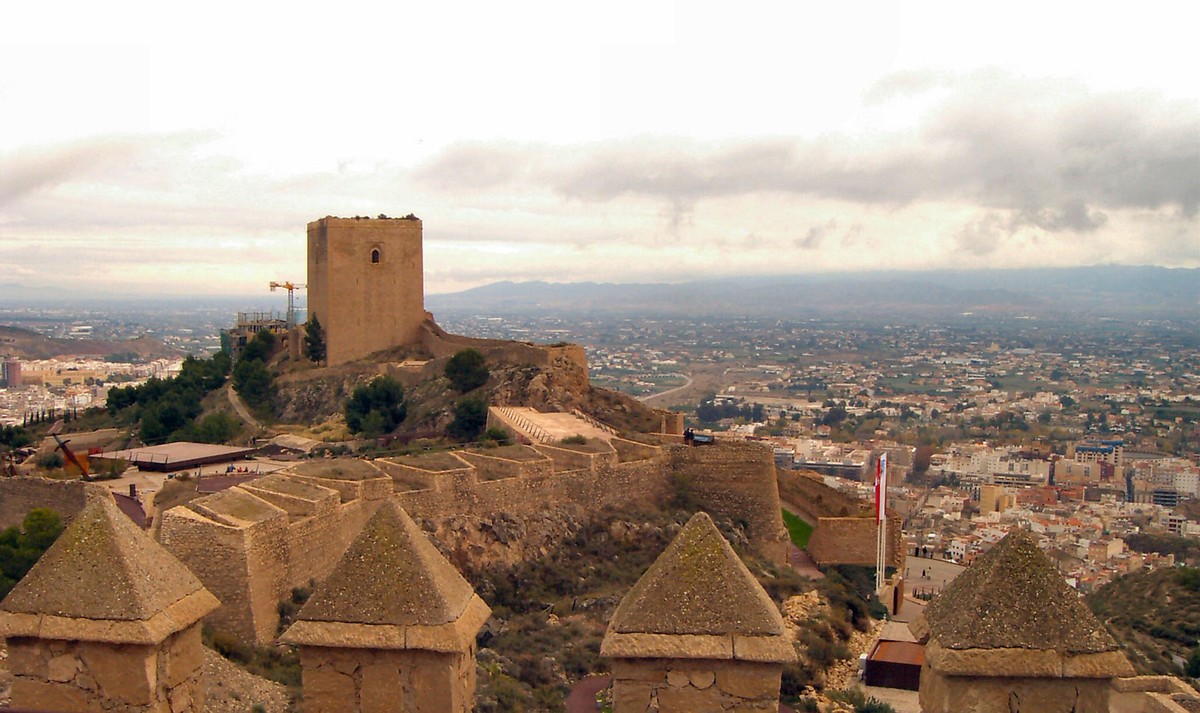
1. Castle Lorca
Located in the province of Murcia, Lorca Castle was designed as a defensive fortress. And very well developed, given that he has never fallen under the power hitter. Constructed a castle on the site of a Muslim stronghold on a high hill. Lorca is today an important cultural center, known as the "Fortress of the sun." Here are organized a variety of events, mostly music.
EScastles02 Highlights Spanish castles
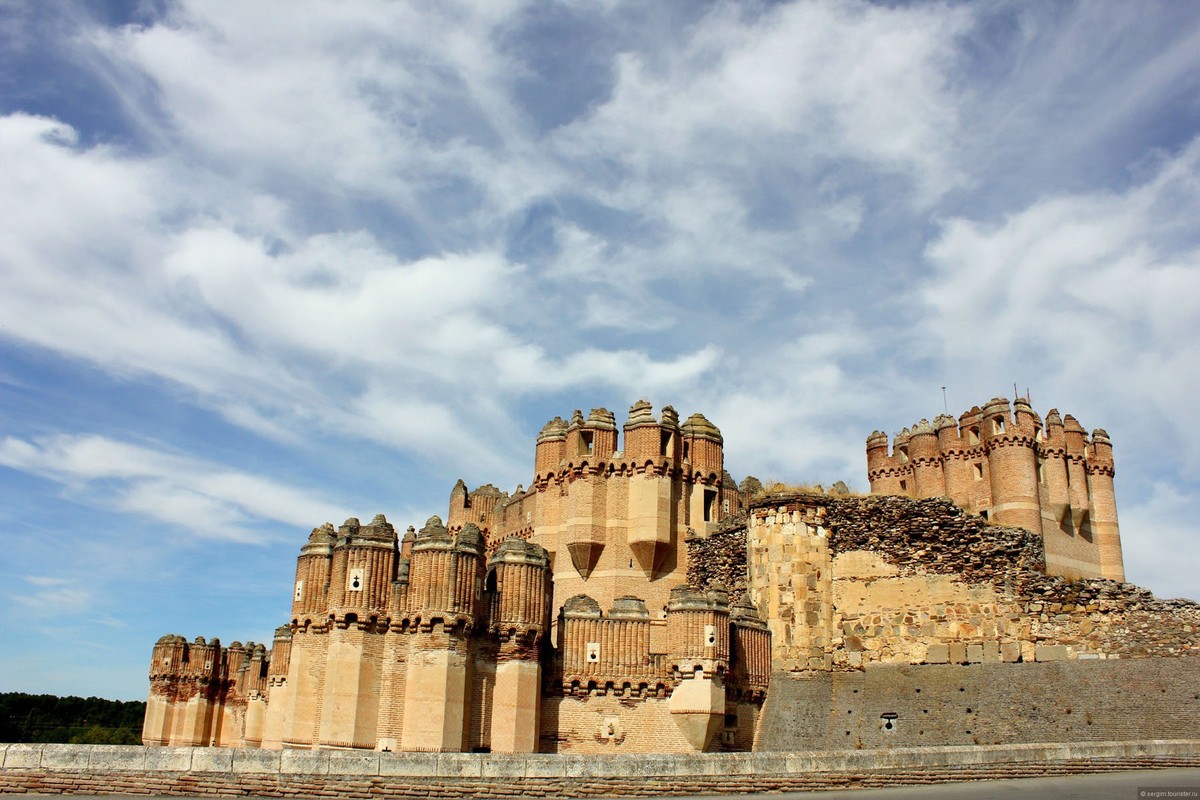
2. Coca Castle
This unique fortification. It has only three walls, and the fourth side is protected by a natural barrier - an insurmountable hill. The castle was built in the 15th century Christians, but under the influence of Moorish architecture. Coca is open to the public and can be visited on a day trip to Segovia, in organized groups.
EScastles03 Highlights Spanish castles
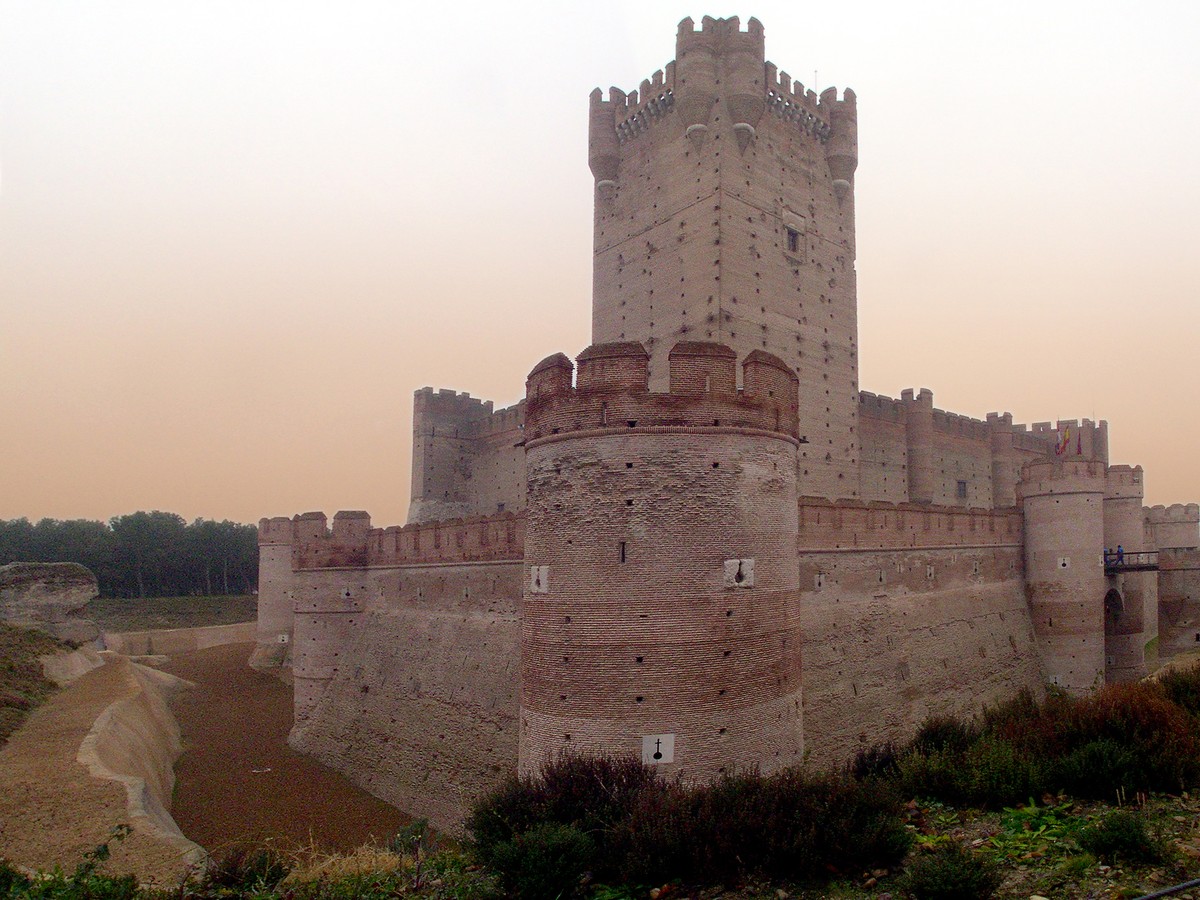
3. Castle La Motta
This reconstructed fortification has its roots in the 11th century. For a long time it challenged the dominion over the kings of Castile and Aragon to rule over the area of ​​Medina del Campo, and in the 15th century the castle finally became Castilian. At one time he was a prison where the legendary figures such as Hernando Pizarro and Cesare Borgia.
EScastles04 Highlights Spanish castles
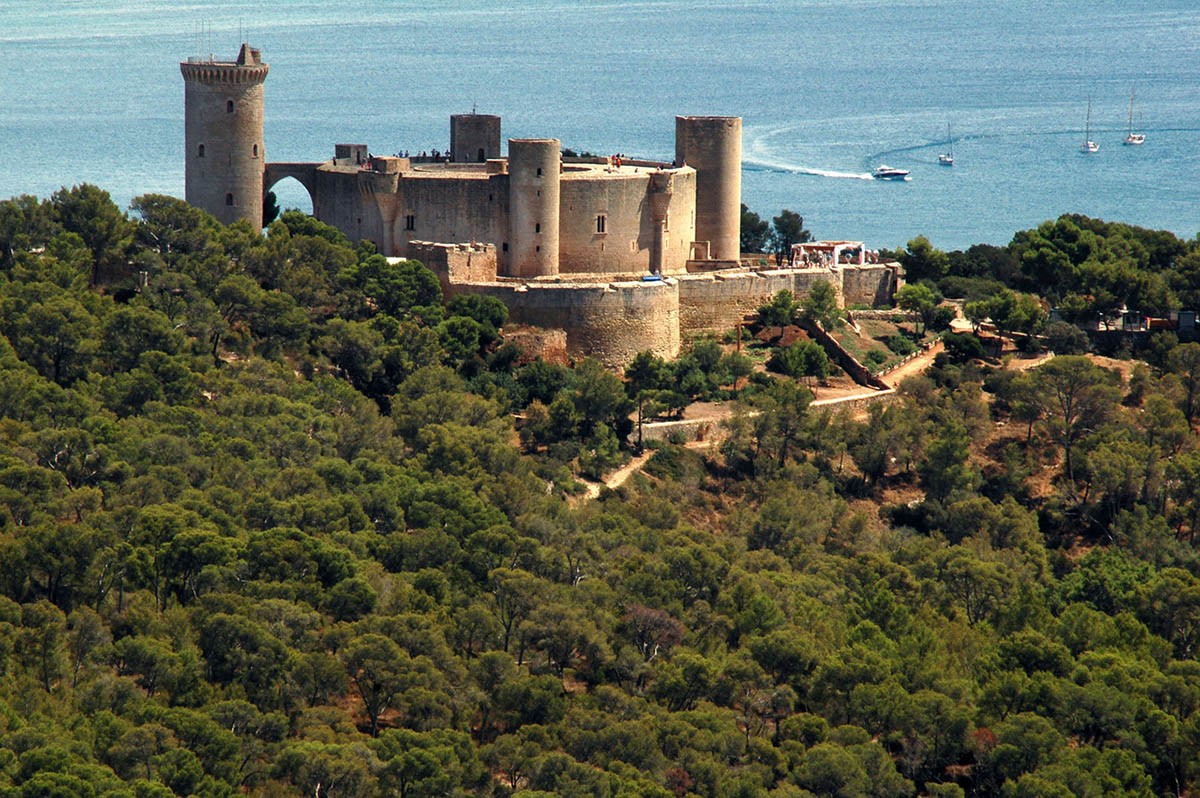
4. Bellver Castle
Tourists who want to explore the Bellver Castle, should reach the island of Mallorca off the coast of Spain. Its walls, the main building and the tower has an unusual for such huge structures circular shape. Bellver long time been used as a political prison, and now it is a museum of history. The castle is surrounded by forests host numerous events and is considered a symbol of the city of Palma de Mallorca.
EScastles05 Highlights Spanish castles
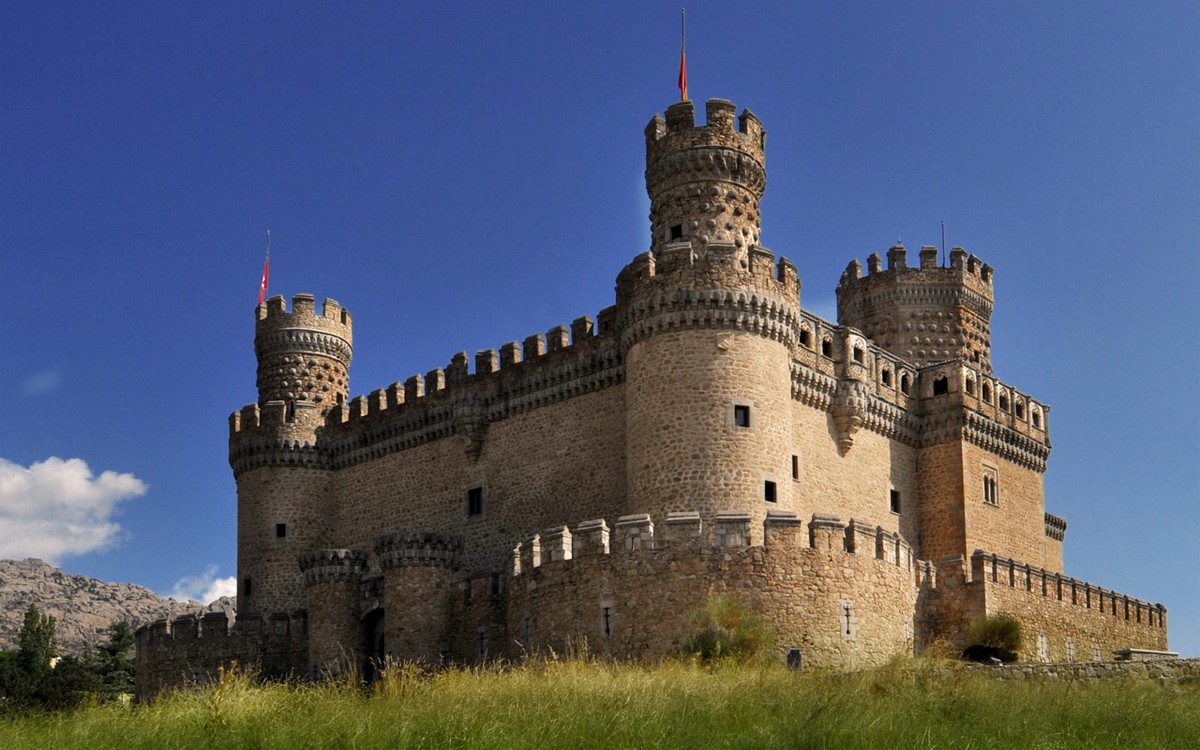
5. Castle Manzanares el Real
This perfectly preserved castle located near Madrid, also known as the Castle de los Mendoza, because for a long time was the residence of the family. Built entirely of granite, fortification is a good example of military architecture of the Spanish, where there is an interesting museum.
EScastles06 Highlights Spanish castles
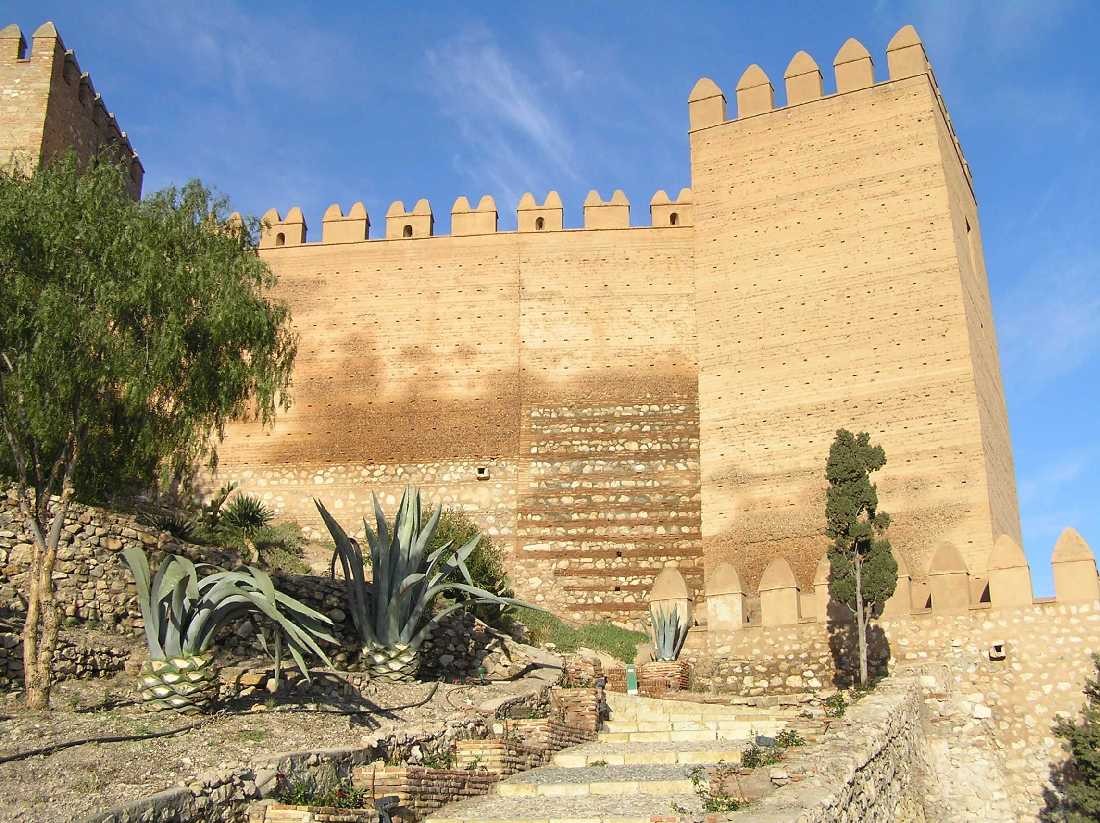
6. Alcazaba de Almeria
Located in the south of Spain fortification occupies a vast territory with houses and shops.Built by Muslims in the 10th century and later converted Christians castle known as a filming of "Conan the Barbarian" and "Indiana Jones and the Last Crusade."
EScastles07 Highlights Spanish castles
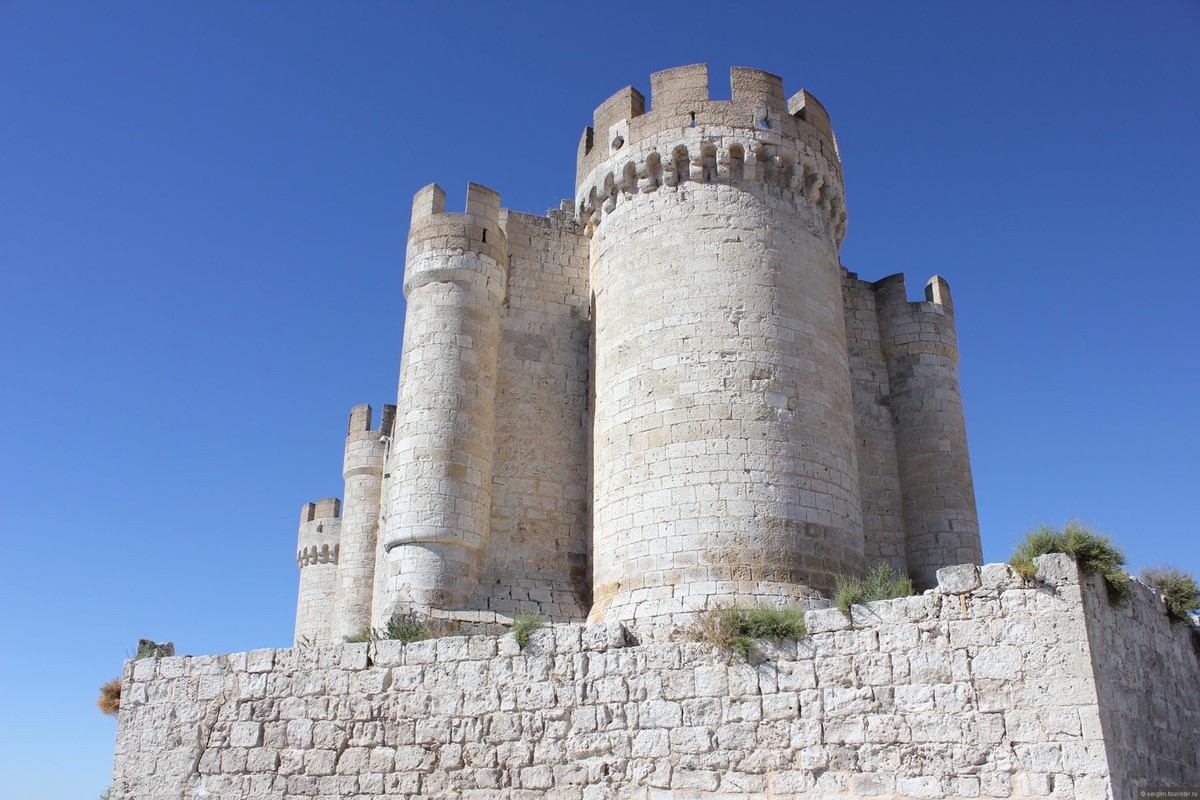
7. Peñafiel Castle
The castle is located in the province of Valladolid and resembles a ship with a 30-meter tall towers. It was built in the period from the 9th to the 15th century and today has a unique wine museum. Particularly impressive Peñafiel night when fully illuminated.
EScastles08 Highlights Spanish castles
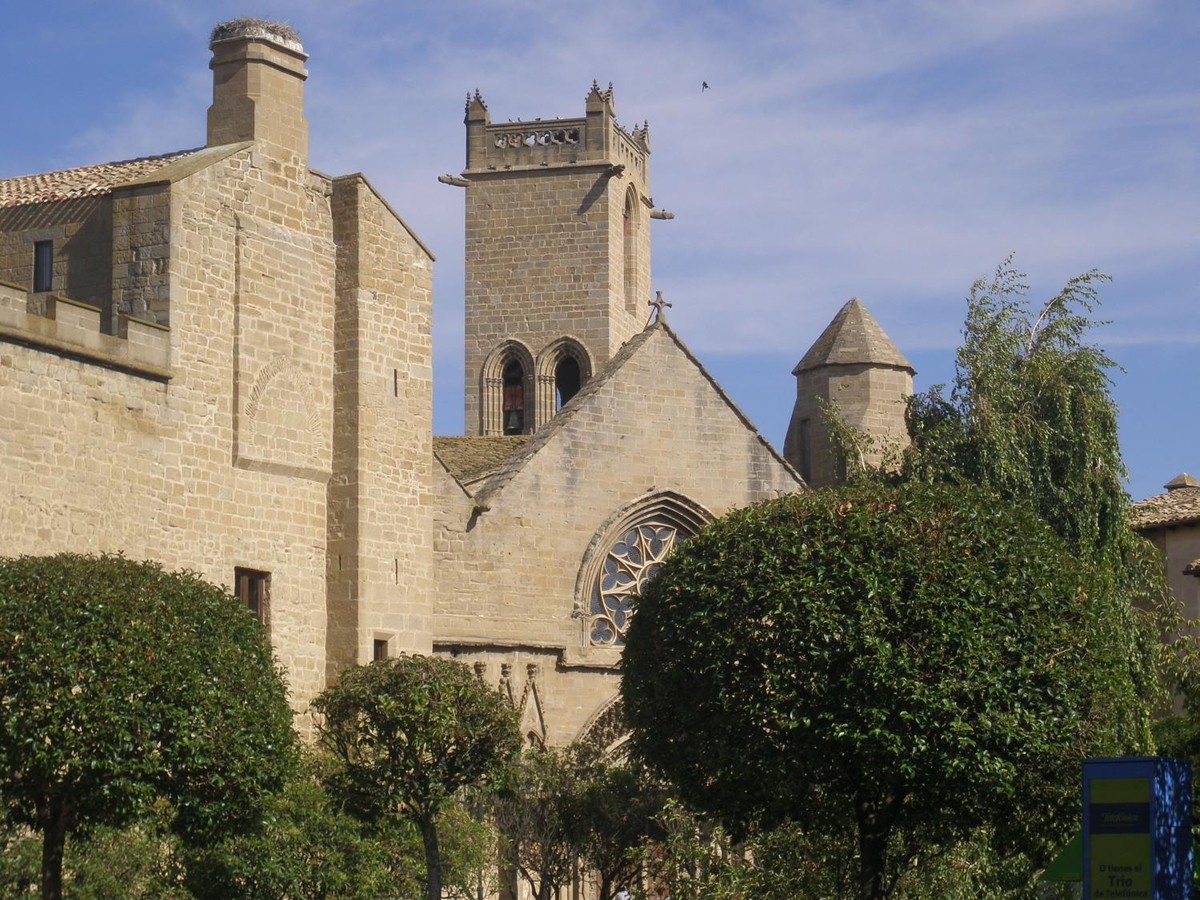
8. Castle Olite
Also known as the Palacio Real de Olite, the castle offers the opportunity to meet other Spanish culture - Navarre, in the north of the country. It was built on the Roman ancient ruins with different architectural styles, with towers, courtyards and gardens.
EScastles09 Highlights Spanish castles
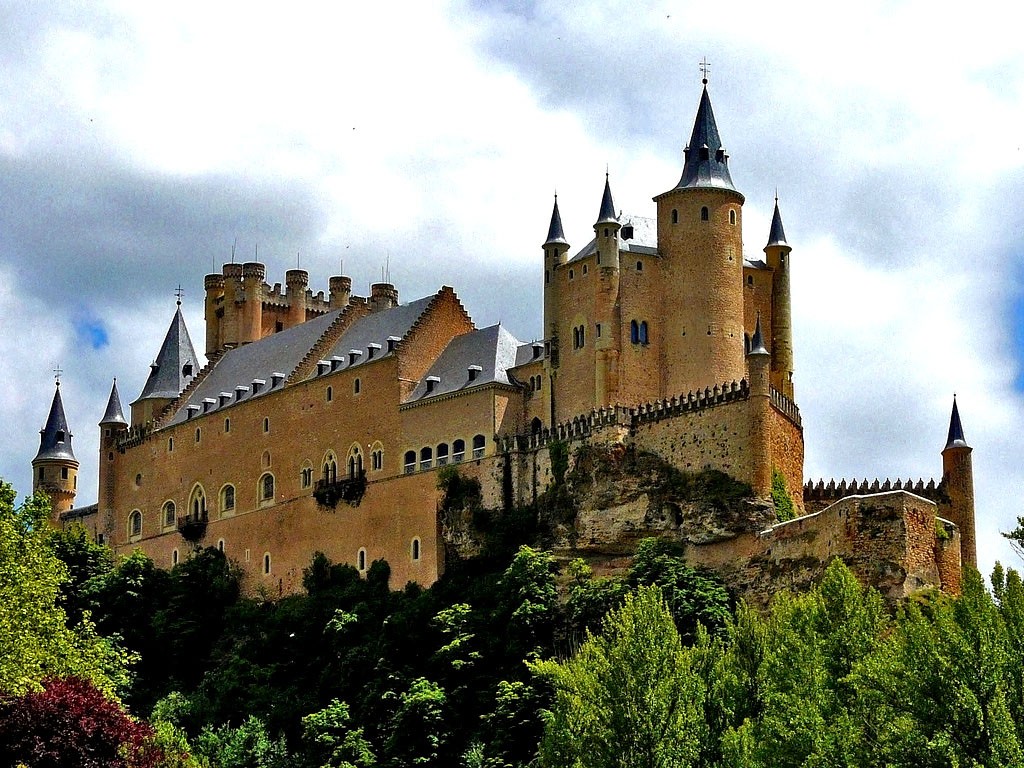
9. The Alcázar de Segovia
Unlike other Spanish castles, Alcazar de Segovia is striking in its beauty and elegance. Here lived many princesses, including the first and Isabella, who in 1474 became Queen of Spain.Currently, you can visit the museum, which displays paintings and rich military arsenal.
EScastles10 Highlights Spanish castles
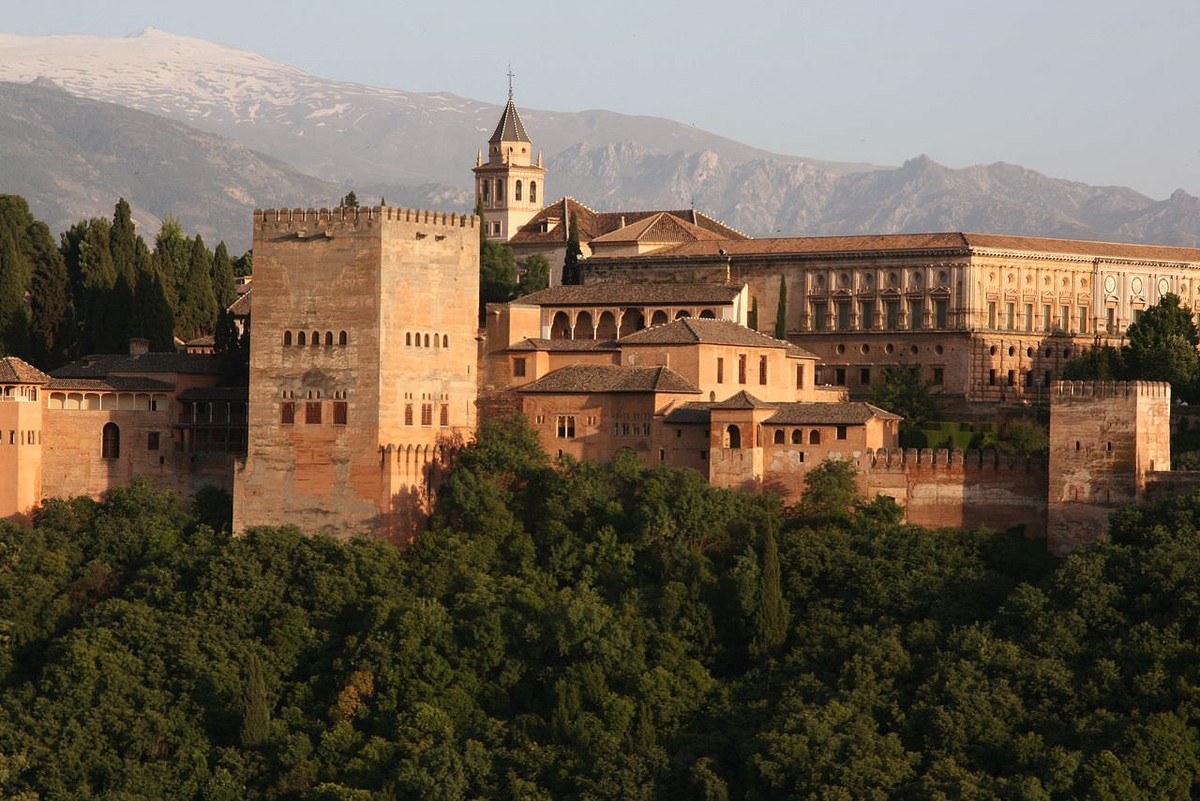
10. Alhambra Castle
Tourists who have time to visit only one castle in Spain, must choose fortification of the Alhambra in Granada. Nothing compares to this ancient fortress, which is also called red castle.Moorish architecture of the castle is fascinating, especially because it preserved perfectly. To get here is not so simple, it is necessary to book tickets in advance.

Data, File and Computer Virus

   3.1  ข้อมูล และสารสนเทศ

             
  ข้อมูล (Data) หมายถึง ข้อเท็จจริงที่อยู่ในรูปแบบต่างๆ  เช่น ตัวเลข ข้อความ  ภาพ เสียง  ภาพเคลื่อนไหว  เป็นต้น   สารสนเทศ (Information) หมายถึง ข้อมูลที่ผ่านการประมวลผลด้วยวิธีที่เหมาะสม  ระบบสารสนเทศมีองค์ประกอบ ดังนี้
        3.1.1  ฮาร์ดแวร์ (Hardware) หมายถึง เครื่องคอมพิวเตอร์และอุปกรณ์รอบข้าง รวมทั้งอุปกรณ์สื่อสารสำหรับเชื่อมโยงคอมพิวเตอร์เข้าเป็นเครือข่ายอีกด้วย
3.1.2  ซอฟต์แวร์ (Software) หมายถึง ลำดับขั้นตอนของคำสั่งที่จะสั่งให้ฮาร์ดแวร์ทำงาน
        3.1.3  บุคลากร หรือพีเพิลแวร์ (Peopleware) หมายถึง ผู้ใช้คอมพิวเตอร์ ผู้ดูแลระบบ นักวิเคราะห์ระบบ หรือนักเขียนโปรแกรม 
3.1.4  ข้อมูล   จะต้องมีความถูกต้อง ชัดเจน และมีมาตรฐานการจัดเก็บ
3.1.5  ขั้นตอนการปฏิบัติงาน  หรือโพรซิเยอร์ (Procedure) เป็นแนวปฏิบัติของผู้ใช้ระบบสารสนเทศ   เพื่อให้ระบบมีประสิทธิภาพและมีความปลอดภัย


peopleware (บุคลากร)  เป็นหัวใจสำคัญของระบบสารสนเทศ
3.2  การจัดเก็บข้อมูล

หน่วยเก็บข้อมูลของคอมพิวเตอร์  ได้แก่ ฮาร์ดดิสก์ ฟล็อปปีดิสก์ ซีดีรอม แฟล็ชไดรว์ ฯลฯ   จะเก็บข้อมูลในรูปของเลขฐานสองประกอบกันเป็นแฟ้มหรือไฟล์ (File)   อาจจะมีการสร้างสารบบหรือไดเร็คทอรี (Directory) หรือโฟล์เดอร์ (Folder) เอาไว้ในหน่วยเก็บข้อมูลเพื่อจัดเก็บไฟล์ให้เป็นหมวดหมู่หรือเป็น องค์ประกอบของไฟล์  มีดังนี้

3.2.1 ชื่อไฟล์ (File Name)  อาจจะเป็นตัวอักษร ตัวเลข หรือสัญลักษณ์ก็ได้ สัญลักษณ์ที่ไม่ยอมให้ใช้ตั้งเป็นชื่อไฟล์ คือ  / (forward slash), \ (back slash),  (quote mark), : (colon), | (pipe),  [ ] (square blacket), * (asterisk), ?(question mark), + (plus sign), = (equal sign), ; (semicolon), <(lesser than), > (greater than), และ , (comma) ชื่อไฟล์ที่เป็นอักษรตัวใหญ่หรือตัวเล็กจะไม่มีความแตกต่างกันในระบบปฏิบัติการ Windows


3.2.2 ประเภทของไฟล์ (File Type)  จะเป็นแจกแจงให้ทราบว่า เป็นไฟล์ประเภทใดหรือ

โปรแกรมประยุกต์ใดสามารถเรียกใช้ได้  ไฟล์จะมีส่วนขยายไฟล์ (File Extention) ต่อท้ายชื่อไฟล์  โดยระหว่างชื่อไฟล์กับส่วนขยายนี้จะมีจุดหรือด็อต (dot) คั่นเอาไว้  (ปกติจะซ่อนไว้ไม่ให้เราเห็น)  ซึ่งส่วนขยายไฟล์จะมีอยู่ 3 ตัวอักขระ  เช่น  ไฟล์ประเภทโปรแกรมจะมีส่วนขยายด็อตคอม(.com) และด็อตอีเอ็กซ์อี (.exe),  ไฟล์ประเภทข้อความจะมีส่วนขยายเป็นด็อตด็อค (.doc) และด็อตเท็กซ์ต์ (.txt)  ขณะที่ไฟล์รูปภาพจะมีส่วนขยายเป็นด็อตกิ๊ฟ (.gif), ด็อตเจเพ็ก (.jpg), ด็อตพิค (.pic)หรือด็อตทิฟ (.tif)  เป็นต้น


3.2.3 ขนาดของไฟล์ (File Size)  ไฟล์หรือโฟลเดอร์จะมีความจุเป็น ไบต์ (Byte) ซึ่งเป็น

หน่วยความจำที่เล็กที่สุดที่มนุษย์สามารถรับรู้ได้  กิโลไบต์ (Kilobyte : KB)  ซึ่งมีค่าเท่ากับ  210 (1,024 ไบต์)เมกกะไบต์ (Megabyte : MB) มีค่าเท่ากับ 220 (1,048,576 ไบต์)   กิกะไบต์ (Giagabyte : GB)   มีค่าเท่ากับ 230 หรือ 1,073,741,824 ไบต์   ตามลำดับ


4.1  ไวรัสคอมพิวเตอร์คืออะไร


  ไวรัสคอมพิวเตอร์ คือ โปรแกรมชนิดหนึ่งที่ถูกเขียนขึ้นเลียนแบบไวรัสที่ทำให้เกิดโรค มีการเจริญเติบโตได้  ขยายและแพร่กระจายตัวเองได้  รวมทั้งหลบซ่อนอำพรางตัวอยู่ในระบบคอมพิวเตอร์  ระบบเครือข่าย  และสื่อเก็บข้อมูลต่างๆ


4.2  อาการของเครื่องที่ติดไวรัสคอมพิวเตอร์
          เราสามารถสังเกตการทำงานของเครื่องคอมพิวเตอร์ว่า  น่าสงสัยว่าจะติดไวรัสหรือไม่ โดยสังเกตอาการที่ผิดปกติ ดังนี้
    4.2.1   ใช้เวลานานกว่าปกติในการเรียกโปรแกรม
    4.2.2   ขนาดของไฟล์โปรแกรมใหญ่ขึ้นจนผิดสังเกต
    4.2.3   วัน เวลาของโปรแกรมหรือไฟล์ข้อมูลเปลี่ยนไป ทั้งๆที่ไม่ได้แก้ไขหรือเรียกใช้งาน
    4.2.4 ขนาดของหน่วยความจำรอง  เช่น ฮาร์ดดิสก์  แฟล็ชไดรว์ (แฮนดีไดรว์) เหลือพื้นที่น้อยลงอย่างผิดสังเกต หรือไม่สามารถเข้าไปใช้งานได้   เป็นต้น
    4.2.5 ไฟแสดงสถานภาพการทำงานของฮาร์ดดิสก์ติดค้างนานผิดปกติ  หรือกระพริบอยู่ตลอดเวลาทั้งที่ไม่ได้เรียกใช้งาน
    4.2.6   คีย์บอร์ดหรือเมาส์ทำงานผิดปกติหรือไม่ทำงานเลย
    4.2.7   คอมพิวเตอร์ทำงานช้าลงโดยไม่ทราบสาเหตุหรือบู้ตตัวเองใหม่โดยที่เราไม่ได้สั่ง
    4.2.8   มีการสูญหายของไฟล์ข้อมูลหรือโปรแกรมโดยไม่ทราบสาเหตุ


4.3  ประเภทของไวรัสคอมพิวเตอร์
          
4.3.1   บู้ตเซ็กเตอร์ไวรัส  Bootsector Virus เป็นไวรัสที่กบดานซุ่มอยู่ในส่วนของดิสก์ที่ต้องใช้ในการบู้ต ที่เรียกว่า  บู้ตเซ็กเตอร์ (Boot Sector)  การเรียกใช้งานดิสก์ก็เท่ากับไปปลุกไวรัสให้ออกมาทำงาน
Boot sector virus example
AntiVir  is checking and hunting the bootsector viruses.
          
4.3.2   โปรแกรมไฟล์ไวรัส  Executable File Virus  เป็นไวรัสชนิดที่แพร่ระบาดด้วยการติดไปกับไฟล์โปรแกรมที่มีส่วนขยายไฟล์เป็น  .com  ,  .exe    .sys   , .dll   โดยสังเกตได้จากขนาดของไฟล์ใหญ่ขึ้นกว่าเดิม  เมื่อเปิดโปรแกรมไวรัสก็จะทำงานและแพร่กระจาย

.exe virus detection example
Avast Antivirus Software  protects a malware .
           
4.3.3   มาโครไวรัส   Macro Virus
เป็นไวรัสที่ก่อกวนการทำงานของโปรแกรมชุดออฟฟิศ  เช่น  Word , Excel , Powerpoint โดยจะสร้างคำสั่งพิเศษที่เรียกว่า มาโคร (Macro) ทำให้การใช้งานมีปัญหา 

          
4.3.4   สคริปต์ไวรัส  เป็นไวรัสที่เป็นภาษาสคริปต์ (Script)  เช่น    VB Script , Javascript       ซึ่งไวรัสเหล่านี้จะทำงานเมื่อผู้ใช้เปิดไฟล์ที่มีส่วนขยายเป็น  .vbs  หรือ  .js ที่เป็นไวรัส   และปกติจะแพร่ผ่านมาทางอินเทอร์เน็ต
Norton AntiVirus detects a script virus.

 4.3.5   ไวรัสโทรจัน    โทรจัน (Trojan)  เป็นไวรัสพวกสปายแวร์ (Spyware) ที่จะคอยล้วงข้อมูลจากเครื่องของเราส่งกลับไปให้ผู้เขียนโปรแกรม  เช่น  ชื่อผู้ใช้งาน (ยูสเซอร์เนม)  รหัสผ่าน  (พาสเวิร์ด)  หรือหมายเลขบัตรเครดิต (เครดิตการ์ด)  เป็นต้น

Virus Trojan Spyware Signpost Shows Internet Or Computer Threats
           

4.3.6   ไวรัสกลายพันธุ์   เป็นไวรัสที่มีความสามารถในการเปลี่ยนแปลงลักษณะของตัวเองไปเรื่อยๆ เพื่อหลีกเลี่ยงการตรวจจับ ที่รู้จักกันมาก  ได้แก่    หนอนต่างๆ (Worms)  ที่แฝงตัวและแพร่หลายผ่านอีเมล์และไฟล์สคริปต์บนอินเทอร์เน็ต


3. การป้องกันและกำจัดไวรัสคอมพิวเตอร์
1.       ทุกครั้งที่ได้รับซอฟท์แวร์ที่ไม่ทราบแหล่งผลิต หรือได้รับแจกฟรี หรือดาวน์โหลดมาใช้ควรตรวจสอบให้แน่ใจก่อนนำมาใช้งาน
2.       การทำสำเนาแลกเปลี่ยนไฟล์ระหว่างเครื่องต้องตรวจสอบก่อนทุกครั้ง อย่ามั่นใจแม้จะมีโปรแกรมป้องกันไวรัสติดตั้งอยู่ในเครื่องแล้วก็ตาม
3.       ควรสำรองข้อมูลที่สำคัญไว้เสมอๆ
4.       ไม่อนุญาตให้คนอื่นมาใช้เครื่องของเรา โดยปราศจากการควบคุมอย่างใกล้ชิด (โดยเฉพาะการนำโปรแกรมต่างๆ มาติดตั้งในเครื่อง)
5.       ต้องเพิ่มความระมัดระวังเมื่อต้องแลกเปลี่ยนข่าวสารหรือกรอกข้อมูลเมื่อใช้อินเทอร์เน็ต  โดยเฉพาะข้อมูลจาการโฆษณาเชิญชวนในรูปของฟรีต่างๆ
6.       พยายามสังเกตสิ่งผิดปกติที่เกิดขึ้นกับคอมพิวเตอร์อยู่เสมอ เช่น การทำงานที่ช้าลง ขนาดไฟล์โตขึ้น หรือเนื้อที่ฮาร์ดดิสก์ลดลงอย่างมากผิดปกติ   หน้าจอแสดงผลแปลกๆ 
ไฟฮาร์ดดิสก์ติดสว่างไม่ยอมดับ   เป็นต้น
7.       ควรหาซอฟต์แวร์ป้องกันไวรัส (Antivirus) ติดตั้งไว้ในเครื่องคอมพิวเตอร์ และอัปเดทฐานข้อมูลไวรัสอย่างสม่ำเสมอ เพื่อป้องกันไวรัสชนิดใหม่ๆ  เช่น  McAfee,  Norton, PC-Cillin,  Panda,  NOD32  เป็นต้น  

โปรแกรมป้องกันไวรัสสามารถหามาใช้งานได้จากเว็บไซต์ผู้ผลิต หรือแหล่งดาวน์โหลดที่เชื่อถือได้   เช่น  Download.comTucows.comThaiware.com  เป็นต้น  ส่วนใหญ่เป็นโปรแกรมประเภทแชร์แวร์ให้ทดลองใช้ 30 วัน